Posts Tagged ‘internet’
Description of ‘internet’ Tag:
Friday, August 26th, 2011
One of the most important elements of creating a website is selecting a proper domain name. A domain name is commonly part of a larger Internet address called a “URL”. Having the right domain name for your website can significantly help establish an online reputation and generate greater visibility. Domain names give both the human visitors as well as the search engines the first description or impression of the website. Choosing a domain name can often be just as important as deciding the name of your business and should not be taken lightly. Finding a successful domain name will require time, patience, and creativity. The following tips are designed to assist in creating successful domain names.
Best Practices for Creating a Domain Name:
- Describe Your Website by Matching Your Domain, Website, and Company Name
A domain name is one of the first elements of a website that visitors see. Matching your domain with your company name will help target your existing as well as potential customers. Having a company and domain that describes your website will also let people know what the website is about and draw in targeted traffic. For example with the domain www.DeliciousPastries.com Delicious Pastries is the company name, website name, domain name, and also highlights Pastries a major descriptive keyword.

- Keep it Short and Readable-
There are several incentives for keeping your Domain name short which include it being easy to type, easy to remember, and easier to travel by word of mouth. A domain name that is longer than 3 words should use hyphens. However a domain name with more than 3 words and hyphens will raise the websites level of spamminess.
Having a keyword in your domain name will help rank not only because it is part of your domain but also because it is the anchor text that others will use to link back to your website.
- Alternative Domain Top Level Domains (TLD)
It’s recommended that you only purchase the .Com version of your… Read the rest
Tags: domain, domain names, internet, keywords, seo, url, urls, website
Posted in Internet Marketing, Search Engine Optimization SEO, Web Development | 1 Comment »
Wednesday, June 22nd, 2011
It was only two months ago that Mozilla released Firefox4, one of the most successful browser releases that received over two hundred million downloads. Following the success of Firefox 4, Mozilla had announced and implemented a new production cycle to accommodate a rapid product release environment. The new production has enabled Mozilla to quickly develop and test new products which have led to them being able to offer a new version of Firefox only months later. As described in the Mozilla Blog, the new release is the first browser to support a Do Not Track privacy feature on multiple platforms.

from http://blog.mozilla.com/blog/2011/04/13/new-channels-for-firefox-rapid-releases/, June 2011
Mozilla first announced its new Rapid Release Development Cycle back in April. The previous production cycle contained three channels which included “Nightly Testing Builds”, “Firefox Beta”, and “Firefox Final Release”. The new development process introduced “ Aurora”. Aurora allows users to test new features and concepts that are more refined than those in the Nightly testing and less polished than the ones available in Beta testing. For a full description on the Mozilla constructing, testing, and release process visit the Mozilla Development Center. The new cycle has enabled Mozilla to test their feature and execute a faster product delivery for their customers. The two months it has taken Mozilla to develop Firefox5 are a drastic difference compared to the two years it took to deliver Firefox 4 to the public.
According to Mozilla “The latest version of Firefox includes more than 1,000 improvements and performance enhancements that make it easier to discover and use all of the innovative features in Firefox. This release adds support for modern Web technologies that make it easier for developers to build amazing Firefox Add-ons, Web applications and websites.”
Visually the new version and Firefox4 display no differences however the recent release now offers support for CSS animations, Do Not Track preferences, improved canvas and JavaScript support, better tuned HTTP idle… Read the rest
Tags: Beta Version, broswer release, browser, Firefox 4, Firefox 5, internet, Mozilla, Mozilla Firefox
Posted in Browser, Browser Modifications | No Comments »
Friday, May 6th, 2011
April was a big month for Facebook, among some of the changes that they implemented were new security tools, Facebook Deals, and the Facebook Send button. Each of the new features was designed to provide users with a safe and beneficial user experience.

The first of the three features that Facebook released was a New Suite of Safety Tools. The new security provides users with additional information for user and family safety. In addition to the existing safety content the new resources include articles and videos on Facebook security and privacy. Along with the new safety content users will now be able to use social reporting tools to express to the community what items they do not like or find offensive. Another part of the new security features is two factor authentications. Two factor authentications are used to further prevent unauthorized users from accessing other user accounts. This protection procedure requires a secondary code when logging in from an unrecognized device or location. The last announced security update for Facebook is the option for users to access Facebook using a secure connection over HTTPS. However, because some apps do not accommodate HTTPS Facebook will need to automatically switch between HTTP and HTTPS given the user’s authorization.
Following the implementation of their new security, Facebook also launched Deals on Facebook. Deals on Facebook is currently being tested and is only offered in certain areas like Atlanta, Dallas, Austin, San Diego, San Francisco (many more to follow shortly). This feature lets Facebook users locate deals from local businesses, share, and coordinate plans with other Facebook users. Deals on Facebook will work similar to Groupon and Living Social but are now built right into the social network, which is convenient for both customers and businesses who utilize Facebook.
The latest addition made to Facebook is the “Send” button. This new button is very similar to the “like” button which was introduced last year. The… Read the rest
Tags: Facebook, facebook deals, internet, like button, send button, social networking, Users
Posted in Facebook, Social Media Marketing, Social Networking | No Comments »
Friday, April 1st, 2011
 The number of users who access the Internet using their mobile device continues to grow each and every day. Approximately more than half of the people who use the Internet access it regularly from a mobile device. As new mobile devices are introduced and as mobile web browsers advance mobile web browsing further solidifies itself as a permanent fixture in our everyday lives. When considering how many or your potential customers are accessing the Internet via their mobile phone you should be asking yourself, is your website mobile friendly? The number of users who access the Internet using their mobile device continues to grow each and every day. Approximately more than half of the people who use the Internet access it regularly from a mobile device. As new mobile devices are introduced and as mobile web browsers advance mobile web browsing further solidifies itself as a permanent fixture in our everyday lives. When considering how many or your potential customers are accessing the Internet via their mobile phone you should be asking yourself, is your website mobile friendly?
The advances of mobile devices has made tremendous progress however many sites that are not optimized for the mobile web often get lost in translation and present a less than desirable user experience. Due to the quick advancements and development it is probably only a matter of time till mobile browsing can offer an experience equal to that of regular Internet browsing. So, another important question to consider would be is the benefit of mobile optimizing worth the effort or would it make more sense to wait a year or two until mobile browsing possess the same technology and capabilities of traditional Internet browsing?
Most of the time if a user is accessing your website from a mobile device there is a higher urgency to make a purchase or perform a critical action such as finding directions to your brick and mortar store or acquire some kind of contact or customer support. I think it is clear that depending on the type of business and the needs of the customers it is probably worth the effort or at the very least wouldn’t hurt to make your website a mobile companion. The following are suggestions to assist you in making your website more compatible with the mobile web environment as opposed to creating an additional website solely for mobile users.
- Test your sites mobile compatibility
Before you make any adjustments to your site you should first test it and see if any changes are necessary. To do this you can navigate to your site on any mobile device or download mobile
… Read the rest
Tags: Browsing, content, internet, link, Mobile, mobile device, Mobile Web, user, web, web browsing
Posted in Mobile Web, Search Engine Optimization SEO | 2 Comments »
Wednesday, March 16th, 2011
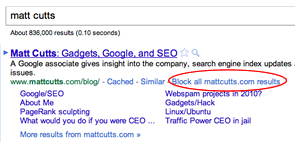
Google’s Blog recently announced a new method for customizing their user’s search experience, which will be available soon.
March 15, 2011 from http://googleblog.blogspot.com
Recognizing that the search results they provide may not be a perfect match, Google is now providing a search site-filter. Initially, Google released this feature as a part of their Google Chrome web browser in January 2011. Seeing that about 15% of Internet users browse using Google Chrome, Google recognized the benefit of offering this feature in their search engine in addition to Google Chrome (see Chrome market share).
Providing this personalized site-filtering feature enables users to avoid unrelated information and block undesirable websites from appearing in their search results. Whether it is because the website is offensive, low quality, or if a customer just doesn’t like it, they now have the option to exclude it from their search results. This feature is now available for people using Google Chrome version 9+, Internet Explorer 8+, and Firefox versions 3.5+ Internet browsers.
Search Results
Although this feature provides customers with a better search experience, could this be used to determine the future rank of a website? In their blog, Google states that they may eventually evaluate and use the data from this feature as a signal for ranking. Presently they are only attempting to offer customers an easy and more controlled search tool.
How It Will Work
When using a compatible browser the person performing the search will notice a “Block all example.com website results” next to the “cached” and “similar” links. These links are located next to the websites URL following the description. After receiving a confirmation request to block the site the results will be hidden until the user decides to deactivate the block. Once blocked, if the search results contain a blocked website a message is then displayed to the user stating some of the results have… Read the rest
Tags: browser, Chrome, filtering feature, Google, internet, results, search, site blocking, website
Posted in Browser, Search Engines | No Comments »
Friday, March 4th, 2011
People who are familiar with Facebook apps (applications) already know that in order to use them they require access to basic information from your account. Before using these apps a user encounters a permission request prompt to access their basic information and it is completely up to the individual to approve or deny that request. Recently Facebook has entertained the notion of applications that requires access to addition personal information found in user accounts. Like the previous request prompts the new apps would require access to your basic information as well as additional data such as your phone number and mailing address.

Although the applications would not have access to your contact information unless you provide them with authorization, this concept has caused concern for users. After announcing the news, Facebook Privacy Settings were faced with much criticism and the debacle eventually caused them to briefly abandon the idea. However, recently Facebook has announced that they are continuing as planned with contact information based applications. Facebook has stated that they only delayed this feature in an attempt to construct a better prompt screen that would inform the individuals accessing the application that their contact information is needed in order to continue.
Given the sensitive nature of personal contact information it is understandable that people are weary of this idea. It is important to remember that Facebook will still maintain their promise regarding not giving out any of your personal information unless you allow them to. If users do not want an application to access their phone number or address then they have the option of not using these programs.
Facebook is currently home to more than 550,000 applications. A number of applications have a legitimate reason for accessing your phone and address, but if you are unsure about sharing your information there are still plenty of other applications to enjoy where the contact information is not needed. Due to the buzz around this issue people have began to automatically assume that Facebook… Read the rest
Tags: applications, contact, contact information, Facebook, information, internet, Users
Posted in Facebook, Web Tips | No Comments »
Friday, February 4th, 2011
 With SEO some primary goals include creating good content, increasing viewer usability, and promoting a website’s popularity, however there are certain practices out there that we avoid. These avoided practices are orchestrated to quickly or prematurely inflate rankings and take advantage of the factors that search engines utilize when ranking sites. These techniques are often referred to as Black Hat Techniques. With SEO some primary goals include creating good content, increasing viewer usability, and promoting a website’s popularity, however there are certain practices out there that we avoid. These avoided practices are orchestrated to quickly or prematurely inflate rankings and take advantage of the factors that search engines utilize when ranking sites. These techniques are often referred to as Black Hat Techniques.
While folks assume there are benefits of using such techniques, there are also major downsides. After using Black Hat techniques a website may temporarily hold a high rank, it will most likely not last very long. Some of the other immediate negative consequences include a site being banned, having penalties against it, and could result in web pages being wiped of their search rank value.
Although search engines devote resources and effort to putting a stop to these methods some still exist. Search engines have worked consistently to ensure that white hat methods remain dominant and discourage the use of black hat tactics.
There are quite a few SEO methods out there that can inadvertently land a website in the search engine dog house. Whether a site is flagged, given the penalties, banned, or you just want to know what to avoid here is a brief list of some of the Black Hat SEO methods to avoid as they could cause issues for a web site.
Cloaking is used to deceive the search engines, what a user sees is different compared to what a search engine robot (bot) would find. Although a site that is utilizing a cloaking technique is open to a penalty, or could be banned there are a few acceptable cloaking techniques called White Hat Cloaking.
Manipulative linking occurs in various forms and exploits search engine link popularity. A common method is using link farms, which is where a group of sites hyperlink to all other sites in the group and the process is generally automated. Some other examples of manipulative linking… Read the rest
Tags: black hat SEO, engine, internet, method, search, search engine, seo
Posted in Internet Marketing, Search Engine Optimization SEO | 1 Comment »
Friday, January 28th, 2011
How to Measure the Value of A Link!
If you are familiar with the  inner workings of a Search Engine then you probably know that search engines calculate the standing of your website using a number of different factors. Link value analysis is among these factors, which is derived from the quantity and reputation of the other web pages that link to your website. In addition to examining the popularity of connected pages, search engines analyze a website’s primary characteristics such as trustworthiness, spam level (is your website useful), and perceptible authority (legitimacy). inner workings of a Search Engine then you probably know that search engines calculate the standing of your website using a number of different factors. Link value analysis is among these factors, which is derived from the quantity and reputation of the other web pages that link to your website. In addition to examining the popularity of connected pages, search engines analyze a website’s primary characteristics such as trustworthiness, spam level (is your website useful), and perceptible authority (legitimacy).
In order to grow the popularity of your website, generate awareness, and increase traffic from search engines it is important to perform link building and analysis. So how do you know the value of a link? Although search engines keep the majority of their ranking factors private, some of the clearer and more notable factors include the following.
- Global Reach: If you want to have a link from a website to your website (a backlink), does that website have quality backlinks to other quality websites, in other words does that website have importance, reach, and scope. Nothing is more impressive than having a well know and hard hitting website in your corner!
- Community Merit: Equally important to websites with global reach are topic specific links that hold merit and commonality to the website on a topic level. Web sites that are in the same business or cover similar topics and industries can provide a stable ranking foundation.
- Anchor Text: Using anchor text is both important on inbound links to your website and navigational links within your website. A well built website can rank higher by using keywords in their anchor text. This anchor text should both describe the link and be a representation of the general content on the target page. It is additionally helpful to use keywords in the anchor text of links guiding traffic to your website. The more onsite and offsite links to your
… Read the rest
Tags: anchor text, backlink, internet, link, website
Posted in Backlinks, Internet Marketing, Search Engine Optimization SEO | 2 Comments »
Wednesday, January 5th, 2011
For those of us who are new to blogging, this article will simply describe how having a blog will promote you and your business. It will also serve up some useful tips for managing your blog properly.
Blogging has been around for sometime now but it was only recently that people had noticed the level of importance and beneficial properties that it offers.  Blogs are basically online interactive journals that span any number of topics. Some blogs are personal, detailing the actions of an individual and some are organization blogs which usually cover topics and events associated with that organization. Disregarding whether it is used as a personal or professional outlet, a blog is a handy instrument that can be used to gain momentum and popularity over the Internet. So a Blog can be a channel for you to express your ideas as well as drive up the success of your business! Blogs are basically online interactive journals that span any number of topics. Some blogs are personal, detailing the actions of an individual and some are organization blogs which usually cover topics and events associated with that organization. Disregarding whether it is used as a personal or professional outlet, a blog is a handy instrument that can be used to gain momentum and popularity over the Internet. So a Blog can be a channel for you to express your ideas as well as drive up the success of your business!
So what are the Benefits Of Having A Blog?
Web Presence!
- A blog is an excellent way to reach out to your existing clients and gain more along the way.
- A quick way to supply news, promotions, ideas, or other information to your audience!
- Offers an effective way to provide customer service and support to your customers!
- A blog helps establish you as a professional.
- Help you build a following and gain respect within your industry and blogging community!
- Efficiently increases traffic to your site! Search engines like, actually love blogs and the keywords found in your blog entries attract more customers to your site looking for information about those keywords.
- Allows for you to obtain rapid feedback from blog participants.
- Writing a blog also makes your company more approachable! People will have an easier time communicating with you because you are on a more personal level.
Are you convinced that you should… Read the rest
Tags: blog help, Blogging, blogs, Business Growth, company blog, internet, weblog
Posted in Blog Hints, Search Engine Optimization SEO, Web Tips | No Comments »
Friday, December 31st, 2010
 Hello there! Welcome to the Internet Beacon’s awesome weblog. If you’re here for SEO tips for small businesses, you’ve come to the right place. Hello there! Welcome to the Internet Beacon’s awesome weblog. If you’re here for SEO tips for small businesses, you’ve come to the right place.
For many people, remaining connected is very important and allows them to maximize their potential. The technology of Smartphone’s enables this connection to reach the next level. Now virtually everything an individual can do from their home or office can be accomplished with a mobile device.
The technology that connects us is ever changing but the reason for this connection remains the same. To learn, experience, share, grow and of course simplify our lives. A Smartphone is a perfect example of making our lives easier. Sure Internet, Email, Texting and Video Chatting in the palm of our hands are all great features but the real highlight is the development of Mobile Applications. There are masses of Apps out there for everything and I mean everything. If you need to learn a language, calculate a tip, make an appointment, find a restaurant, use a flashlight, or navigate directions a Smartphone application has you covered. Small gadgets like these are awesome but what are even more impressive are the Apps that make your work routine easier or more convenient when not in your office.
This is why I put together a list of the top ten mobile Apps for SEO professionals. The Apps detailed below are useful tools that simplify daily tasks for Search Engine Optimization and provide individuals with up-to-date information on their accounts. Apps such as these conveniently allow for the management of their clients, their websites, and crucial statistics. You never know when you may need the data available regardless of if it’s to convey it to a client or only to double check a figure. Mobile Apps like these prevent this issue by keeping a detailed record available to you anywhere and at anytime. Each of the links below provides a description of the application. The Apps range in price from… Read the rest
Tags: Apps, internet, Mobile, Mobile SEO, seo, Smartphone
Posted in Internet Marketing, Mobile Web, Search Engine Optimization SEO | No Comments »
|